

This post is part of the Hacking Sales AI Seller Workflows series. If you’re new here, check out the Start Here page.
Before we dive in, quick shout-outs (no pitches):
Deal Director (Infra Play): I’ve followed his work for ~3 years across X and his newsletter. His depth on AI + infrastructure for GTM leaders has been invaluable, even if you’re not in the infra space.
BowTiedCocoon: a tech sales interview savant who’s helped hundreds break into $100k+ tech sales roles. His most recent post directly connects to today’s topic.
What We’ll Cover Today
Two Practical Workflows:
Automating post call notes
Context Driven AI for Deal Decisions
The setup
The problem
The solution
Workflow #1: Automate Post Call Notes
In BowTiedCocoon’s recent post, the 5-Click Sales Workflow (featuring TechsSalesGuy), he outlines a simply system to automate post-call work:
TL;DR:
Have the call
AI processes the recording
Summary and transcript created
Follow-up drafted automatically
Notes synced straight into your CRM
Stack: Use Gong (or call recording)> Zapier> CRM
Workflow #2: Context Driven AI for Deal Decisions
Here’s where this is relevant and extends further:
You can ingest call transcripts into GPT along with:
Account research (ChatAE, internal docs)
CRM notes
Gong history
Persona context
This lets me build a single thread per account where GPT acts as a thinking partner.
I’m not using AI to think for me.
I’m using it to pressure-test how I’m thinking.
Example (not a “prompt,” just a question):
I’m stalled with [Account]. Based on [recent context] and [challenge XYZ] from the discovery transcript, my plan is to [tactic]. Is this the right path to reach [next goal], or should I refine?
The output helps guide:
Account strategy
Outbound messaging
Deal progression
The Set Up:
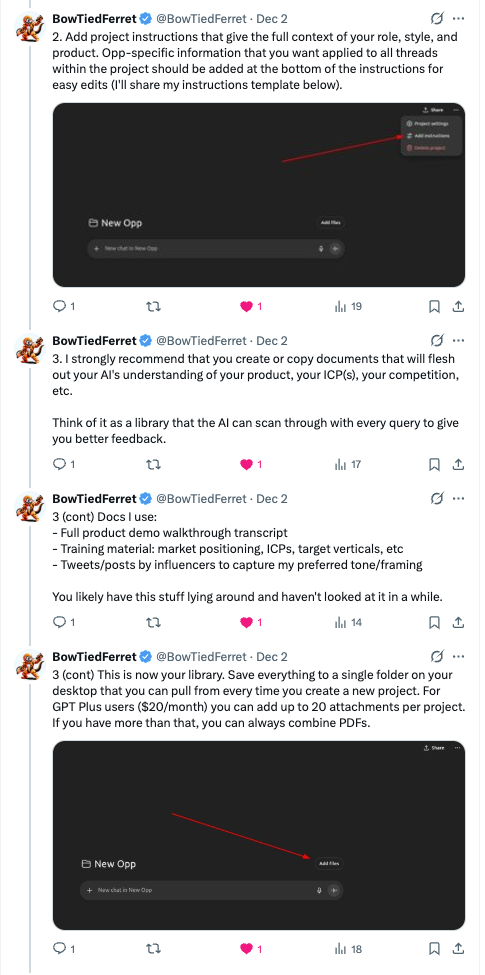
I use a GPT Project Folder that includes:
Product context
Account scoring system
Core persona files
For each account, I upload relevant research and work inside a dedicated thread within the project folder.
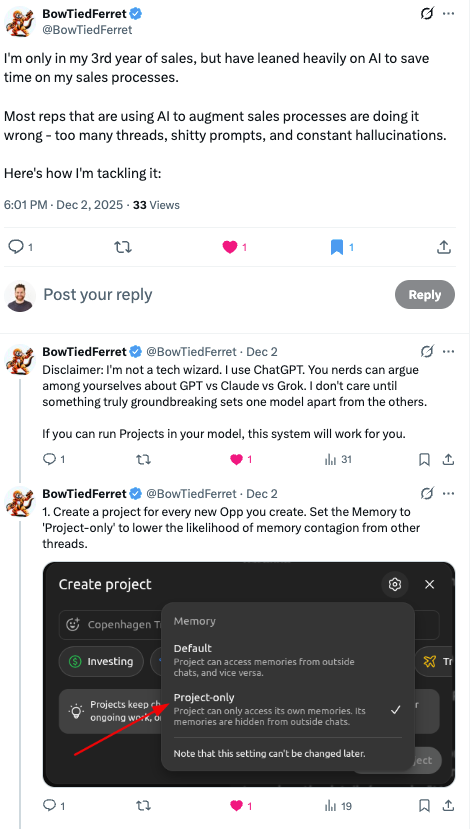
The Problem: Memory & Thread Decay
With my current set up, I run into challenges with memory. Over time, account specific threads can get long over time. When they do, responses can become:
Jumbled
Inaccurate
Blended with other account context
I’m not the only one: enter BowTiedFerret
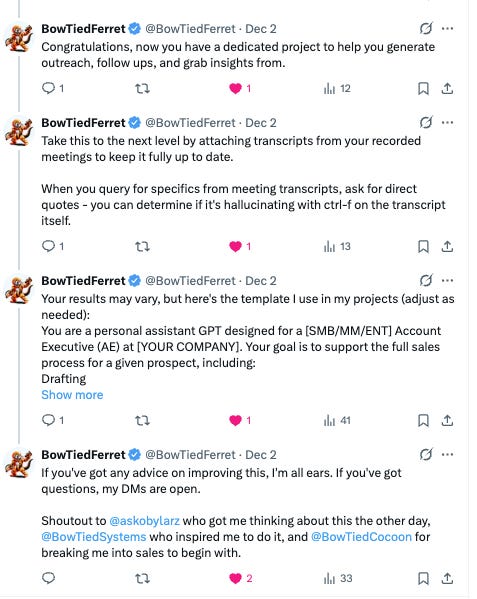
The Solution: credit BowTiedFerret
For Prospecting:
I’m continuing to use threads within my overarching global project folder. This helps me keep:
Broad prospecting context
Universal persona files
Lightweight commands like:
“Use [Persona File] stored in the project folder and [insert task]”
When a Thread Gets Too Long
Inside the account thread, I ask:
Create a concise, structured account snapshot suitable for future messaging and POV work.
Then:
Copy that snapshot
Paste it into a fresh thread (within the project folder)
Keep moving with clean context
Deals in Cycle:
I’m using the BowTiedFerret set up, this way I have all account specific folders so that I have exact context I need and mitigate any context overlap.
That’s it.
Simple workflows. Real leverage.
If you have questions or want to compare setups, feel free to reach out.
If you have an account you’d like me to teardown, DM or email andrew@hackingsales.xyz. Subscribers are prioritized and details are kept anonymous.
Any other questions, comments, thoughts? Send them my way.
As always, thanks for reading and see you all next week.
-Andrew K
PS - if you liked this article, feel free to give a “like”, “comment”, or “share” with your network